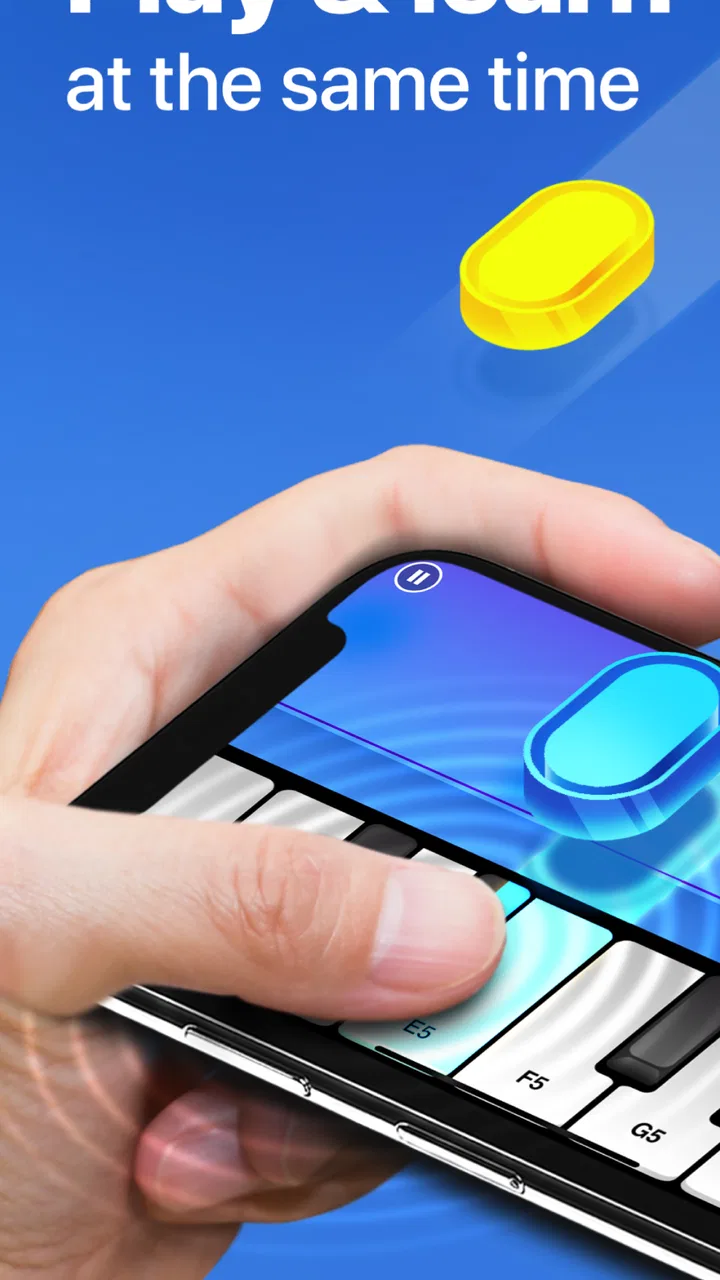
Hello Piano: Learn & Play
- 3.0
- Rating
- 1.00M
- Installs
- Free
- Price

 Analysis by App-foxy
I approached Hello Piano: Learn & Play as a quick way to put a piano lesson inside an ordinary day rather than as a replacement for a teacher or a full keyboard. Its purpose is clear: you play piano, work through songs, and browse a selected collection of Songbooks. That makes it appealing to beginners who want a low-pressure starting point, especially when the alternative is buying equipment before knowing whether regular practice will stick.
My overall impression is mixed but useful. The app is easy to understand at a glance, and the free entry point makes experimenting simple. At the same time, the average score of 3.0 from roughly 900 ratings suggests that the experience has not been equally smooth for everyone. I would not treat that number as a verdict by itself, but I would take it as a reason to approach the app with realistic expectations: it is best tested as a convenient practice tool, not assumed to be a complete learning system.
Where the first session can become frustrating
The biggest risk with a music-learning app is that the user expects to open it and immediately play. In practice, the first session can involve several small points of friction: finding the right song, understanding how the lesson is presented, adjusting the phone or tablet so the keys are comfortable to reach, and working out what the app expects from each attempt. None of these problems necessarily means the app is broken, but they can make a beginner feel lost before playing a complete phrase.
You May Also Like

 Blood Strike: 2.5 Anniversary
Blood Strike’s Loadouts Turn Every Drop Into a Tactical Gamble
A close look at Blood Strike’s custom loadouts: how fast access to signature weapons reshapes its battle royale rhythm, rewards preparation, and narrows the gap between fights.

 Pandora - Music & Podcasts
Pandora’s Music Is Easy to Start, but Harder to Recover
Pandora’s strength is its low-effort path from a seed to a station. Its weak spot is how much confidence it asks you to place in connection, setup, and quiet recovery.

 8 Ball Pool
 Is Built on Rivalries, Rematches, and Routine
A close look at the rivalries, rematches, shared routines, and unanswered safety questions that turn a quick pool match into a persistent mobile community.

 Samsung Music
’s Quiet Strength Is Playing What You Already Own
Its reach comes less from spectacle than from dependable access to a personal library. That simplicity is both the app’s strongest retention engine and its ceiling.

 AccuWeather: Weather Radar
AccuWeather Review: A Quick, Clear Forecast for Everyday Decisions
For everyday plans, the best forecast is the one you can understand quickly. AccuWeather makes rain timing, radar, and local conditions easy to act on, with a few trade-offs.

 Hill Climb Racing
Why Hill Climb Racing Still Turns Crashes Into One More Run
A tiny car, a bumpy hill and one more upgrade: Hill Climb Racing keeps resurfacing because its simple chaos makes every near-miss feel personal.
More From Our News Desk



I recommend beginning with a short, familiar piece rather than choosing something ambitious. A recognizable melody gives you an easier way to judge whether the timing and note guidance make sense. If you start with an unfamiliar song, every mistake becomes difficult to diagnose because you are learning the tune and the interface at the same time.
The Songbooks are useful in this respect because they give the experience some direction instead of leaving you with an empty instrument. I would browse them with a specific goal: choose something for a five-minute warm-up, something slightly more challenging for focused practice, and perhaps one piece you simply enjoy. That small grouping is more practical than jumping randomly between songs whenever a passage feels difficult.
Another common sticking point is confusing practice convenience with musical instruction. A screen can show you where to play, but it cannot fully replace posture advice, relaxed hand movement, listening skills, or feedback from a person who can see what your fingers are doing. I found the app more valuable when I used it to create a habit and learn simple material, rather than expecting it to correct every technical weakness.
The most useful mindset is to treat each session as a small musical task, not a test of talent. If a passage goes wrong, slow down mentally, return to a shorter section, and repeat it before moving on. This approach also helps reveal whether the difficulty comes from the song itself or from the way the app is being used.
What to check before blaming the lesson
Before judging the guidance, make the playing area as stable as possible. A phone held in one hand is a poor setup for piano practice because the display moves precisely when you need to look at it. A flat surface, a comfortable viewing angle, and enough room for both hands make a surprising difference. If you are using a small screen, expect more visual concentration and shorter sessions; the experience is less tiring on a larger display.
Volume also matters. If the sound is too quiet, mistakes can feel mysterious because you cannot clearly hear the result. If it is too loud, you may focus on the device rather than your timing. I prefer a moderate level and a quiet room for the first attempt at a song. Once the notes feel familiar, I can practice in a busier setting without losing the basic pulse.
Keep the device steady and avoid switching between applications during a lesson. Even when the app itself is functioning correctly, interruptions can break concentration and make a simple exercise feel harder than it is. A short session with no distractions is more informative than a longer session spent repeatedly leaving and reopening the app.
It is also worth checking the basic compatibility point before investing time in a routine. The app requires an operating system version of 10 or later, so an older device may be the real reason the installation or performance is troublesome. The current release is version 1.2.3, and keeping the app and operating system in a normal, supported state is a sensible first step whenever behavior seems inconsistent.
I would not decide whether the app suits you after one rushed attempt. Use the free version to test three things: whether the on-screen playing feels comfortable, whether the available song material interests you, and whether you can understand what to do after a mistake. Those are more important than simply seeing a song list and assuming the learning experience will match your expectations.
A simple setup routine that saves time
My preferred routine is deliberately plain. I place the device where I can see it without bending my neck, select one song from the Songbooks, and play through the opening section once without trying to be perfect. Then I repeat only the part that caused trouble. At the end, I play the opening again to check whether the repetition made it feel more natural.
This routine avoids a subtle trap: spending the entire session browsing. Curated content can encourage endless choosing, especially when every new song feels like a fresh start. Limiting yourself to one main piece gives the app a clearer job and makes progress easier to notice.
If you are introducing the app to a child, I would keep the first sessions short and remain nearby. The Everyone age rating makes it broadly accessible, but an age label does not guarantee that every child will understand the instructions independently. A parent can help with positioning, song selection, and patience without turning the activity into a formal lesson.
For an adult beginner, the best time to use it may be immediately after an existing daily habit, such as a morning drink or an evening wind-down. The point is not to create a demanding schedule. It is to remove the decision of when to practice. Five focused minutes repeated often can be more useful than an occasional attempt that starts with searching, setup, and frustration.
Recovering when a song or session goes off track
When a practice attempt starts feeling wrong, I avoid restarting everything immediately. First, I return to the last part that felt clear and check whether the problem is a single missed note, a timing issue, or simple confusion about the next instruction. Each cause needs a different response. Repeating the entire song for a local mistake wastes attention and can make the same error automatic.
If the display seems out of step with your playing, pause and reset your position rather than tapping rapidly in an attempt to catch up. Make sure your fingers are not covering the area you need to read, then try the same short passage again. This is safe, general troubleshooting: it removes positioning and concentration problems before you conclude that the lesson itself is unreliable.
Another helpful recovery method is to separate recognition from performance. Look at the next small group of notes and say their direction or pattern to yourself before playing. You are not trying to turn the app into a theory course; you are giving your eyes a moment to prepare. This can reduce the stop-start feeling that beginners often mistake for a lack of musical ability.
Song selection can also be the cause of a failed session. A piece that is too difficult may make the app appear unhelpful because you spend all your time missing notes. Move temporarily to a simpler song from the Songbooks, rebuild confidence, and return later. That is not giving up; it is using difficulty as a variable you can control.
There is a trade-off here. A curated collection is friendlier than an enormous library with no guidance, but it may not contain the exact song every user wants. If your main goal is to learn a particular modern track, a more specialized lesson service or a teacher may be a better fit. Hello Piano is more convincing when you want structured browsing and accessible practice than when you need a precise arrangement of one specific piece.
In-app purchases cost $7.99 per item, so I would wait before paying for anything. First, confirm that the free experience fits your device, your preferred practice style, and the kind of music you want to play. Paying for additional material only makes sense after you have demonstrated to yourself that you will return to the app. Otherwise, the purchase can become an optimistic promise rather than a useful learning tool.
When the device or environment is the real problem
Not every bad session points to Hello Piano. Audio delay, for example, can come from the device, connected accessories, or the surrounding setup rather than from the lesson content. If timing feels strange, try a basic session with the device placed directly in front of you and without unnecessary accessories. If the issue disappears, the original setup was probably adding friction.
Screen size is another important exception. A person practicing on a compact phone may find the virtual keyboard cramped, while someone using a larger display may have a more comfortable view. That difference can change the entire opinion of the app. Before deciding that the interface is unsuitable, test the same activity on the device you will genuinely use for practice, not just the device used for a quick download.
Network interruptions can likewise make an otherwise simple session feel unreliable when content takes time to appear or a transition does not behave as expected. I would close other demanding applications, return to a stable connection, and try again before drawing a conclusion. These are ordinary checks, but they matter because music practice depends heavily on continuity; a brief interruption breaks rhythm more noticeably than it would in a reading app.
Performance can also suffer when the device is nearly full, running hot, or handling many tasks at once. Giving it a moment to settle and reopening the app is a reasonable first response. If only one particular song repeatedly causes trouble while other parts work normally, record that pattern mentally and avoid assuming that every feature is affected.
The important distinction is between a repeatable app problem and a one-off environmental problem. If the same action fails after a clean restart and a simple setup check, the experience deserves criticism. If it works once the device is stable and the screen is positioned properly, the app may be fine but your original conditions were not.
Who will get the most from it
I see Hello Piano as a good match for curious beginners, casual players returning to piano, and families looking for an approachable music activity. It is also useful for someone who owns no keyboard and wants to explore the basic appeal of playing before making a larger commitment. The free price removes the biggest barrier to that first experiment.
A realistic everyday use case would be an adult with a short break after dinner. Instead of searching for a full lesson, they open the app, choose one Songbook piece, practice its opening section, and stop while the activity still feels manageable. The value is not a dramatic transformation in one evening. It is having a repeatable, low-effort route from spare time to actual playing.
I would be more cautious recommending it to an intermediate pianist seeking detailed technique, a student preparing for formal assessment, or anyone who needs personalized correction. Those users may benefit more from a real instructor, sheet music, or a specialized course with deeper explanations. The app can supplement those resources, but I would not make it the only method for serious development.
It may also be the wrong choice for someone who dislikes learning through a screen or needs a physical keyboard response. Virtual keys are convenient, but they do not provide the same resistance, spacing, or tactile feedback as an instrument. If your goal is to build confident finger technique for an acoustic or digital piano, use the app as a guide alongside that instrument rather than treating the display as an identical substitute.
Compared with ordinary tutorial videos, the advantage is focus: you can move through a selected song collection instead of pausing and rewinding a long explanation. Compared with private lessons, the advantage is availability and price, while the disadvantage is the lack of a person adapting the exercise to your hands and mistakes. Compared with a full music course, Hello Piano feels lighter and easier to start, but potentially less complete for users who want theory, technique, and a broader curriculum in one place.
My practical verdict after weighing the trade-offs
Gismart has positioned this as an Education app with a straightforward musical purpose, and that simplicity is its strongest quality. I like that a beginner can approach it without first understanding a complicated course structure. The Songbooks provide a useful starting point, and the free access makes it reasonable to test the experience honestly rather than relying on screenshots or assumptions.
Still, the modest 3.0 average and the uneven expectations around app-based piano learning should keep your enthusiasm measured. The experience depends on sensible setup, suitable song choice, and a willingness to practice in small sections. If you expect every mistake to receive detailed personal explanation, you will probably find it limited. If you want a convenient way to explore melodies and build a modest routine, it has a clearer case.
The app has more than a million installs, which shows that its basic idea has reached a substantial audience, but popularity does not remove the need to test it on your own device. It is rated for Everyone, and it is free to start, yet the optional purchases mean I would use the free portion as a trial rather than assuming the complete experience is automatically worth the extra cost.
My recommendation is to install it when you want an uncomplicated first step into piano playing. Give yourself several short sessions, use a stable setup, begin with an approachable Songbook selection, and judge progress by whether you return willingly. Choose Hello Piano for accessible song practice; choose a teacher, a physical keyboard, or a deeper course when technique and individualized feedback matter more than convenience.
FAQs for Hello Piano: Learn & Play
01What is Hello Piano: Learn & Play, and who is it designed for?
Hello Piano: Learn & Play is an interactive piano-learning app aimed at beginners and casual learners who want to practice on a phone or tablet. It generally combines guided lessons, song practice, note-reading exercises, and feedback while you play. It can be useful for children, teenagers, and adults, although users with previous piano experience may find the introductory material fairly basic.
02Can I use Hello Piano: Learn & Play without owning a physical piano or keyboard?
Yes, the app is designed to let users practice directly on an on-screen piano, so a separate instrument is not required for getting started. However, playing on a touchscreen is not exactly the same as using real keys, especially for hand position, dynamics, and coordination. If you own a digital piano or MIDI-compatible keyboard, check the current app support and connection requirements before downloading.
03Does Hello Piano: Learn & Play offer free lessons, or is a subscription required?
The app may provide free introductory content, but access to the complete lesson library, song catalog, or advanced practice features can depend on in-app purchases or a subscription. Pricing, trial periods, and available plans may vary by country and platform. Before confirming a purchase, review the payment screen carefully, including renewal terms, cancellation instructions, and whether a free trial automatically converts into a paid subscription.
04Is Hello Piano: Learn & Play suitable for children and complete beginners?
The guided format can make Hello Piano: Learn & Play approachable for people who have never played piano, since lessons are usually broken into short, manageable activities. Children may also enjoy the visual and song-based approach, but parents should review the app’s content, advertisements, privacy settings, and purchase controls. Younger learners will probably benefit most when an adult helps establish regular practice and correct technique.
05Does Hello Piano: Learn & Play work offline, and what permissions does it need?
Some basic exercises may remain available after the required content has been downloaded, but features such as new lessons, song updates, account synchronization, analytics, or subscription verification may require an internet connection. The exact offline functionality can change with app updates. During installation, review requested permissions and the privacy policy, particularly if the app asks for account information, microphone access, or usage-related data.
Pros
- Interactive lessons make learning piano feel engaging and approachable.
- Suitable for beginners with clear guidance and simple practice exercises.
- Playable songs provide motivation and a sense of progress.
- Works well for short practice sessions whenever you have free time.
- Touch controls are convenient when no physical piano is available.
Cons
- A phone screen cannot fully reproduce the feel of real piano keys.
- Some lessons or songs may require a paid subscription.
- Progress can feel limited without regular access to a larger keyboard.
- Small displays may make precise finger placement more difficult.
- The app may not suit advanced players seeking detailed music theory.

Hello Piano: Learn & Play
Gallery